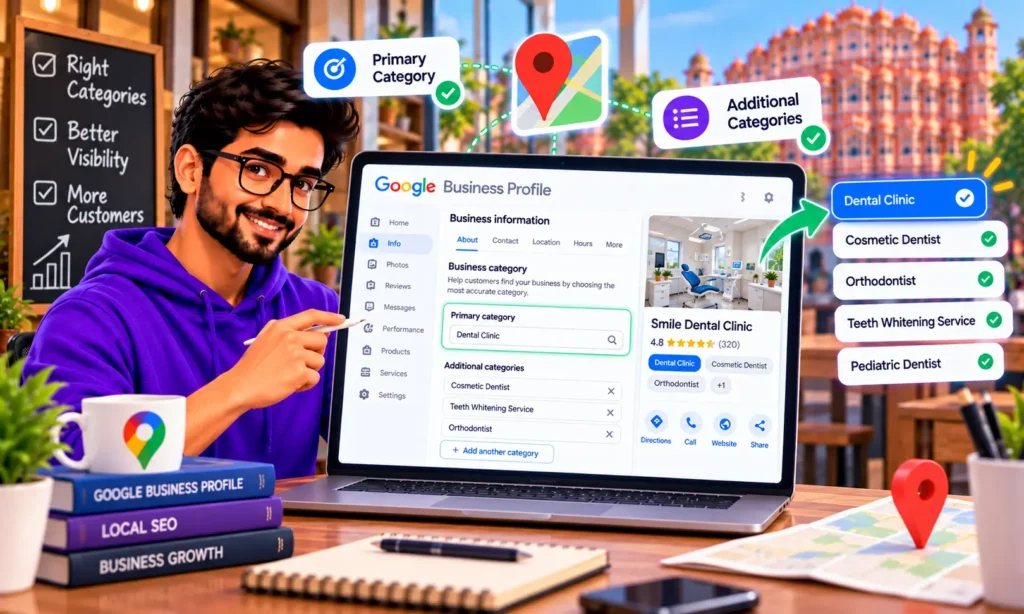
- 1 Why your Google Business Profile category matters
- 2 What are Google Business Profile categories?
- 3 How to choose your primary category
- 4 How to find the right category
- 5 How to choose additional categories
- 6 Examples of thinking it through
- 7 How to add or change your categories
- 8 Common mistakes
- 9 Do categories help you rank higher?
- 10 Quick checklist
- 11 Do it yourself or get help?
- 12 Frequently asked questions
- 13 Want your categories and your whole profile reviewed?
Why your Google Business Profile category matters
Of all the settings in your Business Profile, the category is one of the simplest and one of the easiest to get wrong. It tells Google what kind of business you are, and it affects which searches you can appear for.
Google’s own help page says that your categories inform customers about what your business does, and that the categories you select affect your local ranking on Google. It gives an example: if your primary category is “Pizza restaurant,” Google might show your business when someone searches for restaurants, Italian restaurants or pizza.
This guide explains how primary and additional categories work, how to choose them, and the mistakes to avoid.
Not sure your categories are right? Book a call with Ankit and find out whether your profile needs ranking work, optimization, or both. Book a call
What are Google Business Profile categories?
Categories are labels from a fixed list that describe your business, such as “Restaurant” or “Nail salon.” You choose them when you set up your profile, and you can change them later.
You may also see them called Google My Business categories or GMB categories. Google My Business is the old name for Google Business Profile, and the categories work the same way.
There are two kinds:
- Primary category: the one that best describes your business as a whole. Every profile needs one.
- Additional categories: optional extras that describe special departments or services.
How to choose your primary category
Google’s guidance is straightforward:
- Describe the business as a whole. Choose the category that covers what your business mainly is.
- Be specific. Google’s own example is to choose “Nail salon” instead of “Salon.”
- Pick from the dropdown. When you start typing, a list of available categories appears, and you must choose from it. You cannot create your own category.
- If your exact category is not available, choose a more general category that still accurately describes your business.
A useful test, taken from Google’s bulk upload guidance, is to choose categories that describe what your business is, not what it has. A petrol station with an ATM is a petrol station. It is not an ATM.
How to find the right category
There is no need to hunt through a giant list. Do this instead:
- Open the category field in your profile and type the most natural word for your business. Read every option that appears.
- Try several words. Type different names for your business and its main service, and note the matches.
- Look at competitors that appear for your main searches. The primary category usually shows under the business name on the listing, so you can see what they use. Check this on the listing yourself. Additional categories are generally not visible to the public.
- Choose the most specific option that is still true.
People often search for a complete “GMB categories list” or “Google business profile categories list.” Google does not make you browse one. You see the available options as you type, so the dropdown is the most reliable list, because it matches what Google currently offers for your account and location.
How to choose additional categories
Google describes additional categories as a way to tell customers about special departments or services. Its example is a grocery store with a pharmacy and a deli: choose “Grocery store” as the primary category, then add “Pharmacy” and “Deli” as additional categories.
Rules to follow:
- Add a category only if it really describes part of your business. Choose what you are, not what you have.
- Do not add the category of an independently run business on your premises. Google’s example: if your gym has a cafe run by someone else, do not add “Cafe.” The cafe operator should create their own profile.
- Do not add unrelated categories to try to appear for more searches.
How many? Google’s bulk upload help says you can add up to nine additional categories. That is a limit, not a target. Many local SEO guides suggest keeping to two or three that clearly fit, and I agree, because a long list of loosely related categories makes the profile less clear. This is common advice, not a Google rule.
Examples of thinking it through
These examples show the reasoning. Always check the dropdown for the exact names available to you.
| Business | Primary category thinking | Additional categories |
|---|---|---|
| Pizza place | A specific category such as “Pizza restaurant,” as in Google’s own example | Add only if you genuinely offer another service, such as takeaway |
| Nail studio | “Nail salon”, not just “Salon” | Add other services you actually provide |
| Grocery shop with a bakery counter | “Grocery store” | “Bakery”, if the bakery is part of your business |
| Gym with its own cafe (same owner) | The gym category | “Cafe” only if you run it yourself and it is open to customers |
| Gym with a cafe run by another business | The gym category | Do not add “Cafe” |
If you work at customers’ locations and have no shopfront, categories still matter. Read our guide on local SEO without a physical address as well.
How to add or change your categories
These steps follow Google’s help page. Button names can differ by device.
- Open your Business Profile on Search or Maps.
- Under About, or next to the business category, select Edit or Business category.
- In the Primary category box, type and select your category from the options.
- To add one more, select Add another category, then type and select it.
- To remove an additional category, select Remove next to it.
- Save your changes.
If you cannot find your profile or the edit options, start with our guide on why your business is not showing on Google Maps.
Before you change a primary category, note what you had, make one change at a time, and look at how the profile appears over the following days. I cannot promise how quickly a change will show or what it will do to your visibility, so avoid changing it repeatedly.
Categories fixed but still not showing up for your main search? The gap may be elsewhere in your profile. Book a call with Ankit and get a clear next step. Book a call
Common mistakes
- Choosing a category that is too general when a specific one is available.
- Choosing services as categories. Use the services section of your profile for individual services, and categories for what your business is.
- Adding too many categories to cast a wide net.
- Adding unrelated categories, which makes it unclear what the business is.
- Adding the category of a business that you do not run.
- Copying a competitor blindly. Use competitors as a hint, then check that the category is true for you.
- Choosing a category that does not match your website or what you actually sell.
- Using a specialist label you are not qualified for. If you work in a regulated profession such as medicine or dentistry, check your professional council’s rules before using a specialist category.
Do categories help you rank higher?
Google states that your categories affect your local ranking, so they are worth getting right. They are one part of relevance, which sits alongside distance and prominence, and they will not make up for a weak or incomplete profile. For the whole process, read how to rank higher on Google Maps, the guide to the Google local pack, and our guide to Google Business Profile optimization. To see how you appear, learn how to check your Google Maps ranking.
Quick checklist
- Primary category describes what your business mainly is, and is as specific as the dropdown allows.
- Every additional category describes a real part of your business.
- No category of an independently run business on your premises.
- No unrelated or loosely related categories.
- Categories match your website and your services list.
- You have checked the profile after any change.
Once your categories are right, keep the rest of your presence consistent with our guide to free business listing sites in India, our local SEO checklist and our guide to getting more customers from Google Maps.
Do it yourself or get help?
Choosing categories takes a few minutes, but the right choice depends on your business and your competition. If you want a full review of your profile, see our local SEO services, compare agency vs DIY Google Business Profile optimization, and check our guide to Google Business Profile optimization cost in India.
Frequently asked questions
How many categories can I add to my Google Business Profile?
You need one primary category, and Google’s bulk upload help says you can add up to nine additional ones. Fewer, well-chosen categories usually work better.
Can I create my own Google Business Profile category?
No. You can only choose from the list Google provides. If your exact category is not there, choose a more general one that still accurately describes your business.
What is a primary category on Google Business Profile?
It is the category that best describes your business as a whole. Google recommends being specific, for example “Nail salon” instead of “Salon.”
Is there a full list of Google My Business categories?
You see the options as you type in the category field of your profile, which is the most reliable list for your account. Lists on other websites can be out of date.
Can I change my primary category later?
Yes, you can edit it in your profile. Make one change at a time and check how the profile appears afterwards.
Do categories affect my Google ranking?
Google says the categories you select affect your local ranking. They are one factor among several.
Google Business Profile me category kaise chunein?
Profile me category box me apne business ka naam type karein aur dropdown me se sabse specific category chunein, jaise “Salon” ki jagah “Nail salon”. Apni khud ki category nahi bana sakte. Agar exact category na mile to general category chunein jo aapke business ko sahi batati ho. Additional category sirf wahi jodein jo sach me aapke business ka hissa ho.
Want your categories and your whole profile reviewed?
The right categories help Google understand your business, but they work best alongside a complete, accurate and visible profile. If you are not sure where the gap is, a fresh pair of eyes helps.
On a call, Ankit looks at your profile and tells you whether you need ranking work, profile optimization, or both, and what to fix first.
Book a call with Ankit and get a clear plan to rank or optimize your Google Business Profile.