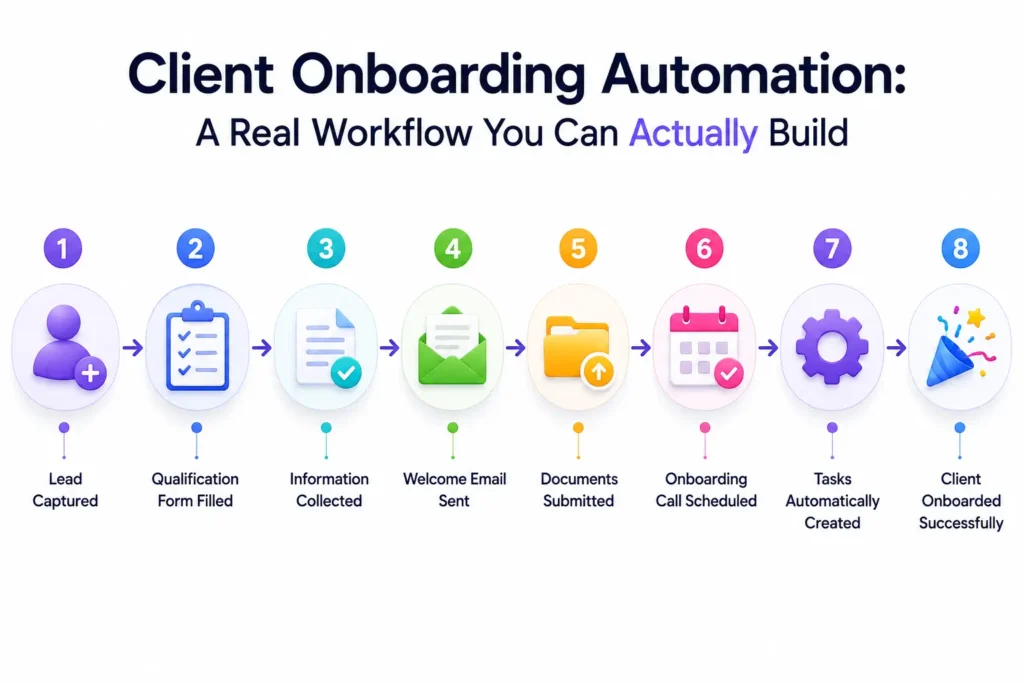
Quick answer: Client onboarding automation means setting up a system so that once someone signs a contract, the next steps, scheduling a kickoff call, requesting files, granting account access, briefing your team, happen automatically instead of someone manually chasing each one. You can build this with dedicated onboarding software, or for free using workflow tools like n8n or Gumloop connected to your existing CRM and forms. Either way, the payoff is real: agencies that invest heavily in a client’s first 30 days see meaningfully longer client relationships than those that don’t.
If you’re searching for client onboarding automation specifically, you’re likely already feeling the pain of doing this manually, forgotten steps, inconsistent client experience, and hours spent on logistics instead of actual client work. Here’s what a real, working version of this looks like, with a concrete example and a free way to build it yourself.
The Real Cost of Not Automating This
Before the workflow itself, it’s worth being honest about what manual onboarding actually costs. Every new client who has a rocky, disorganized first few weeks is statistically more likely to churn early, and every hour your team spends chasing intake forms or manually granting software access is an hour not spent on the work you’re actually being paid for. Client onboarding automation isn’t about replacing the relationship-building part of onboarding, it’s about removing the repetitive, forgettable logistics so your team’s time goes toward the parts that actually need a human.
Why This Actually Matters, Not Just a Nice-to-Have
Here’s a number worth sitting with: the average client tenure at digital agencies is around 30 months, according to industry reporting. Agencies that invest disproportionately in a client’s first 30 days consistently land at the higher end of that range. In plain terms, how well you onboard a new client has a measurable effect on how long they stay, which means client onboarding automation isn’t just an efficiency project, it’s directly connected to revenue retention.
Manual onboarding usually depends on one person remembering roughly 30 individual steps spread across five different tools, sending a welcome email, creating a folder, requesting login access, scheduling a call, briefing the team, and more. Every one of those steps is a place where something gets forgotten, delayed, or done inconsistently between clients. Client onboarding automation exists specifically to close that gap, turning a process that depends on someone’s memory into one that runs the same reliable way every time.
What “Automated” Onboarding Actually Looks Like
In plain English: automation means a trigger, something that happens once, like a contract being signed, starts a chain of actions automatically, without a human doing each one by hand. A common, well-tested version of this looks like 10 connected steps:
- Contract signed (the trigger)
- Kickoff call automatically scheduled
- Asset and information request sent to the client (an “intake form”, a structured form asking for logos, brand guidelines, account access, or whatever your work needs)
- Account access provisioned (the client’s tools are connected, logins created)
- Scope confirmation sent, restating exactly what was agreed to avoid mismatched expectations
- Internal team briefing triggered automatically
- Welcome document or kickoff document generated and sent
- Project or task board created and populated
- First milestone or check-in scheduled
- 30-day check-in automatically scheduled from day one
None of this requires someone remembering to do it. Once it’s built, it runs the same way every single time, for every client.
A Real Example: How This Actually Plays Out
Picture a small marketing agency signing a new client through a proposal tool. The moment that contract is signed, here’s what an automated onboarding workflow does without anyone touching it: it creates the client’s record in the CRM, generates a kickoff document using the details from the signed proposal, sends the client a structured intake form asking for brand assets and account access, and posts a notification in the team’s Slack channel so the account manager knows to prepare for the first call. Once the client submits their access details through the intake form, the workflow automatically grants exactly the access needed, nothing more, and logs that it happened.
That last part matters more than it sounds. A common, quietly serious problem with manual onboarding is access sprawl: passwords shared over Slack or email, access granted and then never revoked once a project ends. An automated ai onboarding workflow can tie access directly to the agreed scope of work, granting only what’s needed and creating a clean, logged record, so security becomes a natural byproduct of the process instead of a separate task someone has to remember.
How to Know If Your Automation Is Actually Working
Once a client onboarding automation is running, it’s worth tracking a few simple numbers rather than just assuming it’s helping:
- Time from signature to kickoff call. This should shrink noticeably and become consistent across clients, not vary wildly depending on who’s handling that client.
- How often information is missing at kickoff. If your team is still asking for basics (logins, brand assets) during the first call, the intake step in your automation isn’t capturing what it should yet.
- Team hours spent on onboarding logistics per client. Track this before and after building the automation, this is the most direct way to see the actual time savings.
- Early churn rate for new clients. Given the connection between strong first-30-day experiences and longer client tenure, this is the metric that ties the whole effort back to revenue.
If none of these improve after building an automation, that’s a sign the workflow needs adjusting, not that automation itself doesn’t work.
Common Mistakes When You First Automate Customer Onboarding
A few patterns show up repeatedly when agencies first attempt this:
- Trying to automate the whole 10-step system on day one. This is the same mistake that sinks a lot of AI agent projects generally, ambition without a working foundation. Build 2-3 steps, confirm they work reliably, then expand.
- Forgetting to test with a real client before rolling it out fully. An automation that looks correct on paper can break in small, annoying ways once real, messy human data (a client who fills out a form incompletely, for instance) hits it.
- Automating the logistics but not adjusting the human parts. If your team was previously trained to manually check every step, they need new instructions for what they’re actually responsible for once automation handles the routine parts, otherwise things fall through a different gap.
- No fallback for when something fails. Automations occasionally break, an API changes, a form field gets renamed. Build in a simple alert (a Slack message, an email) so a broken step gets caught quickly rather than silently failing for weeks.
- Treating automate customer onboarding as a one-time project. The workflow should get reviewed and adjusted periodically as your services or client types change, not built once and left untouched indefinitely.
Avoiding these five mistakes matters more than the specific tool you pick. A well-built 3-step automation using free tools will outperform a poorly maintained 10-step system built on expensive software.
Two Ways to Build This
Option 1: Dedicated onboarding software. Tools built specifically for this, ones like Dock, OnRamp, GuideCX, and dashClicks, give you ready-made client portals, checklists, and progress tracking out of the box. This is the faster path if you want something running quickly and don’t mind a monthly subscription built around this one purpose.
Option 2: Build it yourself with general automation tools. This is the free (or much cheaper) path. Using a tool like n8n or Zapier, covered in detail in our n8n vs. Zapier comparison, you connect your existing CRM, your form tool, and your communication tools (Slack, email) into the same 10-step sequence described above, without paying for separate onboarding software at all. If you want an AI agent to handle more judgment-based steps, like drafting a personalized kickoff document based on what the client actually said in their intake form, a tool like Gumloop, covered in our guide to free AI agents, can generate that automatically rather than using a static template.
Neither approach is universally better. Dedicated software is faster to set up if budget isn’t the main concern. Building it yourself with automation tools costs less but takes more of your own time upfront to configure.
Building Your Own AI Onboarding Workflow: A Starting Point
If you want to try the DIY route, here’s a realistic first version to build, rather than the full 10-step system all at once:
- Start with just the trigger and one action. Connect your contract or payment tool so that a signed contract automatically creates a new record in your CRM. That’s it, don’t build more yet.
- Add the intake form step. Once the CRM record exists, automatically send the client a form requesting whatever information you always need (brand assets, logins, goals).
- Add the internal notification. When the client submits that form, post a message in your team’s Slack or send an email so someone knows to follow up.
- Test it on one real client before automating everything else. This catches confusing steps or missing information before it affects every future client.
- Add the remaining steps gradually, kickoff scheduling, access provisioning, the 30-day check-in, one at a time, once the first few steps are working reliably.
This mirrors the same “start small” advice that applies to AI agents generally: a working 3-step automation beats an ambitious 10-step one that’s half-finished and unreliable.
What This Actually Saves You
Beyond the client-tenure benefit already mentioned, automate customer onboarding thinking in terms of hours, not just outcomes: if manual onboarding currently takes your team even 2-3 hours of coordination per new client, automating the repetitive parts (scheduling, form-chasing, access setup) can cut that down to a genuine 15-20 minutes of actual human judgment, reviewing what came in, having the actual kickoff conversation, rather than chasing logistics.
If you’re building this kind of system into a client-facing offering yourself, our Business Growth course covers pricing and packaging this kind of automation work, and our AI Digital Marketing course covers the broader AI-and-automation skill set this fits into. Client onboarding automation is also a genuinely strong service to offer other agencies and small businesses directly, since almost every service business shares this same pain point, whether they’ve realized it yet or not.
FAQ Section
Q: What tools are best for client onboarding automation on a small budget? A: n8n, covered in our n8n vs. Zapier comparison, is genuinely free if self-hosted and can build this entire workflow without a dedicated onboarding software subscription. Zapier and Make are also viable, at a higher ongoing cost depending on volume.
Q: Can AI actually write personalized onboarding documents, or does it need a human? A: AI agent tools can draft a genuinely personalized kickoff document using the actual details a client submitted, rather than a generic template, though a quick human review before sending is still worth doing, especially early on while you’re testing the workflow.
Q: How long does it take to build a client onboarding automation from scratch? A: Starting with just the first 2-3 steps (trigger, CRM record creation, intake form) can realistically be built in a single afternoon by someone comfortable with a tool like n8n or Zapier. The full 10-step version typically gets built gradually over several weeks as each piece is tested.
Q: Does automating onboarding make it feel impersonal to the client? A: Not if it’s built correctly, automation should handle logistics (scheduling, forms, access), not replace the actual human kickoff conversation. Done well, automation frees up more time for the parts that genuinely benefit from a human touch, not less.